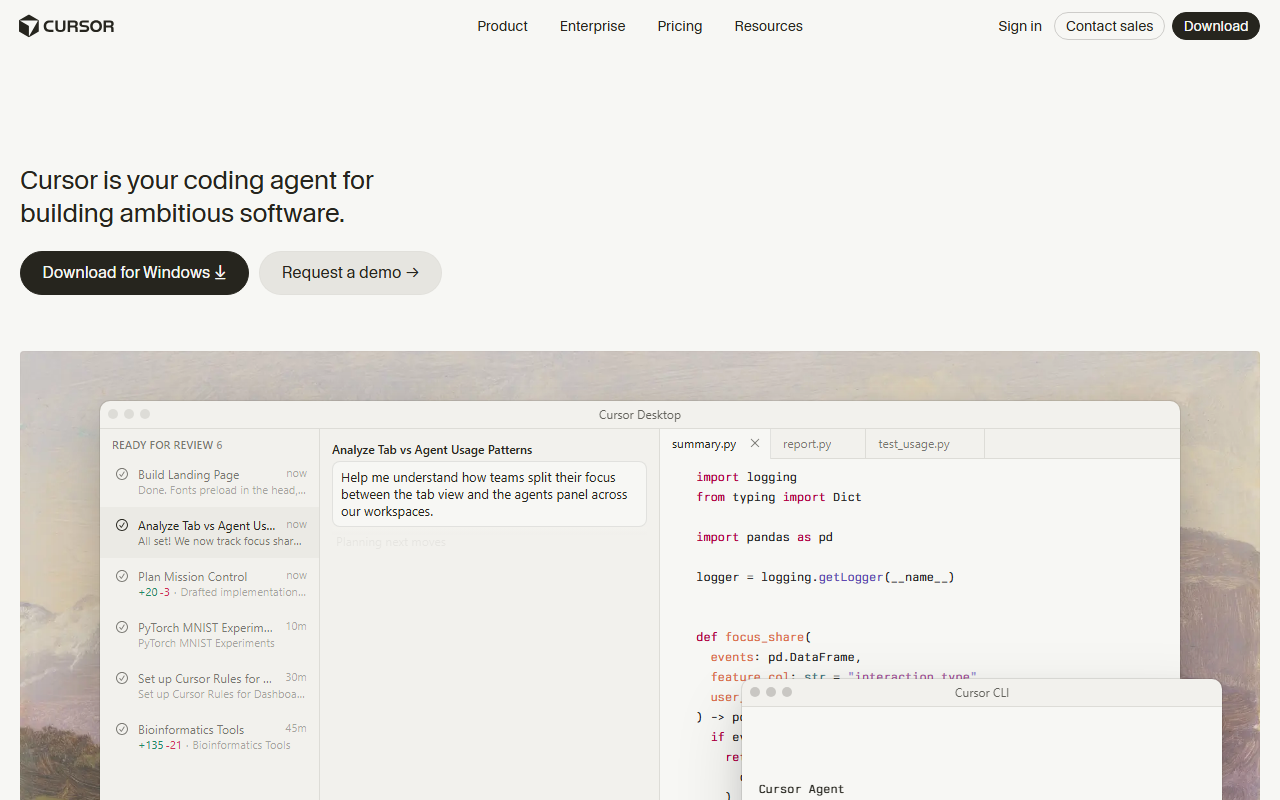
The best AI tool for code in 2026 is Cursor for most developers, at $20/month for the Individual plan. If you work mostly from a terminal on complex, multi-file problems, Claude Code — now bundled into the $17–20/month Claude Pro plan instead of billed per token — is the stronger pick. If you want to try AI coding help without paying anything, GitHub Copilot's free plan gives you 2,000 completions a month with no card required.
Short answer: Cursor ($20/month) is the best all-round AI tool for code — it works inside a familiar VS Code-style editor and handles most day-to-day coding well. Claude Code, now included in the $17–20/month Claude Pro plan, is the strongest pick for terminal-based, senior-level work. GitHub Copilot's free tier (2,000 completions/month, $0) is the best way to try AI coding help at zero cost.
Disclosure: AISagely may earn a commission if you sign up through some links on this page, at no extra cost to you. It does not change the ranking — I say plainly when the free tier is the smarter move.
I'm an AI/ML master's student and I write code with these tools most weeks, not just for review demos. The AI coding market moved fast again this year: Claude Code left the per-token-only billing model that used to scare people off, GitHub Copilot rolled out a real free tier, and Cursor's plans got simpler. Below is where things actually stand, based on hands-on use, not feature-page copy.
How I picked these tools
I only ranked tools I put through the same work: a small feature added across three files, a bug fix in code I hadn't written, and a rename-and-refactor task with the existing test suite as the judge. I timed how long each task took, counted how many follow-up prompts it took to get a change that passed tests, and tracked what a normal week of use would actually cost — because with usage-based billing, the number on the pricing page and the number on your card statement aren't always the same.
Tools that produced a working, test-passing change with minimal hand-holding made the list below. Tools that needed as much cleanup as writing the code myself didn't, no matter how good their demo video looked.
Top picks at a glance
| Tool | Best for | Entry price | Free tier |
|---|---|---|---|
| Cursor | Most developers, day-to-day coding | $20/mo (Individual) | Yes — Hobby, limited agent/tab use |
| Claude Code | Terminal-based, complex, senior work | $17–20/mo (via Claude Pro) | Yes — limited use on Claude's free plan |
| GitHub Copilot | Trying AI coding help at no cost | $0/mo (Free) | Yes — 2,000 completions/month |
Prices shift often in this category. I confirmed all three directly on GitHub’s plans page, Cursor’s pricing page, and Claude’s pricing page on July 14, 2026 — check them again before you buy, since AI vendors change tiers with little notice.
Best overall: Cursor
Cursor is the tool I'd point a new user to first. It's built on top of VS Code, so nothing about the interface fights you, and its agent can plan a change, edit multiple files, and run your tests without much steering. The Individual plan is $20/month with no annual-only discount trap — you get extended agent limits, generous access to frontier models, MCP and hooks support, and cloud agents that can keep working on a task after you close your laptop.
In my testing, the three-file feature task was where Cursor pulled ahead: it found the right files to touch on its own and asked one clarifying question instead of guessing. The refactor task went almost as smoothly — one round of back-and-forth to fix a missed import, then a clean test pass. Its free Hobby tier exists but the agent limits are tight enough that you'll hit them inside a single real task, so budget for the $20/month plan if you're doing more than the occasional tweak. Try Cursor here: Try Cursor →.
Best for value: Claude Code
This is the pick that changed the most since last year. Claude Code used to be API-only — you paid per token, and a hard debugging session could burn well past $15 in an afternoon with no warning. That's no longer the only option: Claude Code is now included in the standard Claude Pro plan, priced at $17/month billed annually ($200 up front) or $20/month billed monthly, per Claude’s pricing page. You still get a heavier Max plan starting around $100/month if you need much higher usage, but the entry price is now a flat, predictable subscription instead of a metered bill.
When I tested Claude Code on the bug-fix task — tracing a failure through code with no comments and an unfamiliar naming scheme — it read the surrounding files unprompted before proposing a fix, which is exactly the kind of context-gathering that saves a debugging session from going sideways. It's still a command-line tool at heart, so if you want a visual editor experience, Cursor will feel more natural. But for terminal-first developers doing serious refactors, the combination of strong multi-file reasoning and a now-predictable subscription price makes it the best value in this list, not just the most capable. Try Claude Code here: Try Claude Code →.
Best free option: GitHub Copilot
GitHub Copilot's free plan is the most usable $0 option in coding AI right now. Per GitHub’s plans page, it gives you 2,000 code completions a month, access to multiple AI models, the Copilot CLI, and community support — no credit card needed to start. That's enough for genuine day-to-day use if you're a student, hobbyist, or just want to see what AI-assisted coding feels like before paying for anything.
In my test, the free tier handled inline completions and small single-file edits well; it's the same underlying completion experience as the paid plans, just capped. Where it showed the ceiling was the multi-file feature task — the free plan doesn't include the cloud agent access or the $15 in monthly AI credits that Copilot Pro ($10/month) adds, so larger agentic tasks either got throttled or needed manual stitching across files. If you outgrow the free tier, Pro at $10/month is the cheapest paid step up in this whole category, and Pro+ at $39/month adds premium models like Opus for heavier work. Try Copilot here: Try Github Copilot →.
How to choose the right one
Start with where you spend your day. If you live in an editor and want an AI-native experience without relearning your tools, Cursor's $20/month plan is the easiest yes — it's the pick most developers should try first, and my ChatGPT alternatives for coding guide has more detail on how it stacks up against other editor-based tools.
If your work is mostly terminal-driven — deep refactors, debugging unfamiliar codebases, scripting — Claude Code's move to flat Claude Pro pricing removes the main reason people used to hesitate. Just know it's a CLI tool, not an IDE, so there's a learning curve if you've never worked that way. For a broader look at what Claude can do outside of code, see how to use Claude AI.
If you're not ready to pay for anything yet, start with GitHub Copilot's free tier for a few weeks of real use before deciding whether to upgrade. Students in particular should check GitHub's education program, which has historically included Copilot access. If you'd rather test general-purpose AI chat tools before committing to a dedicated coding assistant, how to use ChatGPT for free and how to use Gemini AI cover the no-cost paths on the chat side.
One thing to watch regardless of which tool you pick: usage-based add-ons (Copilot's AI credits, Cursor's usage billing beyond plan limits) can turn a flat-looking price into a variable one during a heavy month. Check your usage dashboard after the first couple of weeks so a surprise bill doesn't undo the value case. If you want a tool that can run longer, multi-step jobs on its own once you're comfortable with the basics, my guide on how to use ChatGPT agents covers the automation side of this, which several coding tools are now converging toward.
My verdict
For most developers, Cursor at $20/month is the best AI tool for code in 2026 — it's approachable, capable across ordinary feature work, and doesn't require living in a terminal. Claude Code is my pick if your work is genuinely terminal-first and complex, and the new Claude Pro bundling makes it a much easier recommendation than it was when it was API-only. GitHub Copilot's free tier is the right place to start if you haven't spent a dollar on AI coding help yet — it's a real product, not a crippled trial.
Skip this if you're not sure you'll use it weekly: none of these tools are worth $20/month for occasional use. Use GitHub Copilot's free plan or a general chat tool like ChatGPT’s free plan until AI coding help becomes part of your regular workflow, then upgrade.
For the broader AI toolkit beyond code, see our ranked best AI writing tools guide.
Frequently Asked Questions
What is the best AI tool for code in 2026?
Cursor is the best all-round AI tool for code for most developers, at $20/month for the Individual plan. Claude Code is stronger for terminal-based, complex engineering work, and it's now bundled into the $17–20/month Claude Pro plan instead of billed per token. GitHub Copilot's free tier is the best way to start at no cost.
Is GitHub Copilot's free plan actually usable?
Yes, for light to moderate use. It includes 2,000 completions a month, access to multiple AI models, and the Copilot CLI, with no credit card required. In my testing it handled everyday inline completions and small edits well; larger multi-file agent tasks are where the free tier's limits show, since those need the Pro plan's cloud agent access.
How much should I expect to pay for an AI coding tool?
Between $0 and $20/month covers most individual use. GitHub Copilot's free tier costs nothing. GitHub Copilot Pro is $10/month. Cursor's Individual plan and Claude Pro (which now includes Claude Code) are both $17–20/month. Heavier users can move up to Copilot Pro+ ($39/month) or Claude Max (from $100/month), but most developers never need those tiers.
Is Claude Code worth it now that it's part of Claude Pro?
For terminal-first developers, yes. The old objection to Claude Code was unpredictable API billing — a hard debugging session could cost more than a monthly subscription in one sitting. Bundling it into the flat $17–20/month Claude Pro plan removes that risk for most usage levels, though very heavy users may still want to watch their usage against plan limits.
Do I still need ChatGPT if I use a dedicated coding tool?
Often, yes, for a different job. ChatGPT and other chat tools are still useful for explaining unfamiliar concepts or thinking through a design before you write code. Dedicated tools like Cursor and Claude Code are better once you're actually editing a real codebase, because they can see your files and make changes directly instead of you copy-pasting snippets back and forth.